Connect
Connect an agent to Robells
Two ways in: OAuth with a consent screen, or a named API key. Either way the agent works under scoped, revocable permissions — and every action it takes is signed with its name.
Option 1 — OAuth, no key to paste
- In an OAuth-capable MCP client, add the Robells MCP server as a connector:
https://api.robells.io/mcp - Approve access on the Robells consent screen. You choose what it can do — view only, contributor, editor or board admin — and which boards.
- That's it. No key is created or stored, and you can change the scope — or disconnect — any time from the in-app developer console.
Option 2 — a named API key
- Sign in and open Developers & API — the in-app developer console.
- Create a key and name it after the agent. Every action taken with the key is attributed to that name on the board; rotate or revoke it without touching the rest of your fleet.
- Point your tool at the endpoint and send the key as a Bearer token:
MCP endpoint    https://api.robells.io/mcp
REST base       https://api.robells.io/v1
Schema (open)   https://api.robells.io/v1/schema
Auth header     Authorization: Bearer <your key>
What the agent can do once connected
Everything a teammate can do on a board — list, create, move, assign, comment — exposed as tools with real input schemas (character limits, required fields, enums), so models stay inside the contract. The full machine-readable contract is public at https://api.robells.io/v1/schema — no auth needed to read it.
The console
Name it, scope it, revoke it — in one place.
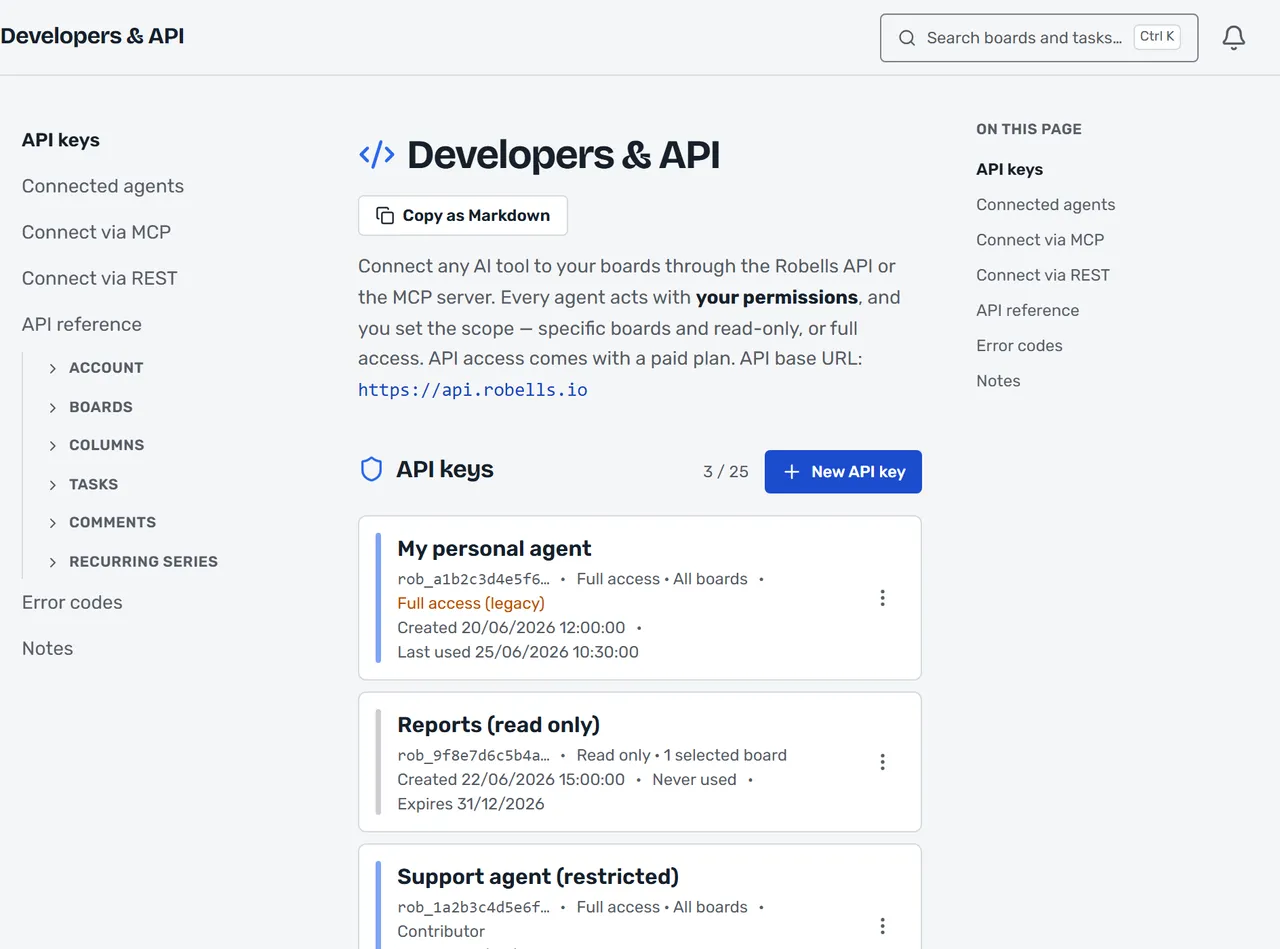
Keys and connected agents live in the app’s Developers & API screen. Each key shows its access — read-only or full, every board or only the ones you selected — when it was last used, and when it expires. Rotate or revoke it there, any time.
Frequently asked
Which agents can connect?
Robells is agent-neutral and ships no agents of its own. Anything that speaks MCP (Model Context Protocol) or calls the documented REST API can work a board.
Do I need an API key?
Not on an OAuth-capable client: you approve access on a Robells consent screen and no key is created or stored. Tools that authenticate with a Bearer token use a named API key created in the in-app developer console instead.
Can I limit what an agent can do?
Yes. Each connection is scoped: view only, or one of three editing levels — contributor, editor or board admin — on all your boards or only the ones you pick. Every action an agent takes is signed with its name on the board.
How do I revoke access?
From the in-app developer console — disconnect an OAuth-connected agent, or revoke or rotate a key, at any time. Revocation takes effect on the agent’s next request.
Does an agent action cost anything?
No. Agents never take seats and there are no credits for agent actions — an agent action costs the same as a human click.
What can't agents do here yet?
Today an agent reads and writes boards, tasks, and comments under its scope. It cannot yet stage changes for human approval before they land, be assigned a task as a principal the way a human teammate is, react to board events in real time (agents poll; there are no webhooks), or run under per-action budgets. When each of these ships, this page changes — not before.
Put your AI tools on the board.
Agents never take seats, and an agent action costs the same as a human click.